
| Access To MySQL |  Download |
 Guide |
Access To MySQL
Introduction
Access to MySQL is a small program that will convert Microsoft Access Databases to MySQL.
- Wizard interface.
- Transfer data directly from one server to another.
- Create a dump file.
- Select tables to transfer.
- Select fields to transfer.
- Transfer password protected databases.
- Supports both shared security and user-level security.
- Optional transfer of indexes.
- Optional transfer of records.
- Optional transfer of default values in field definitions.
- Identifies and transfers auto number field types.
- Command line interface.
- Easy install, uninstall and upgrade.
Using Access to MySQL
When you start the program it will run you through a wizard. The wizard will ask you all the necessary questions to setup the database transfer. In the first step you are asked to supply the file name of the Microsoft Access Database to convert.
If your Access database requires you to log in you can specify a user name, password and a system database.
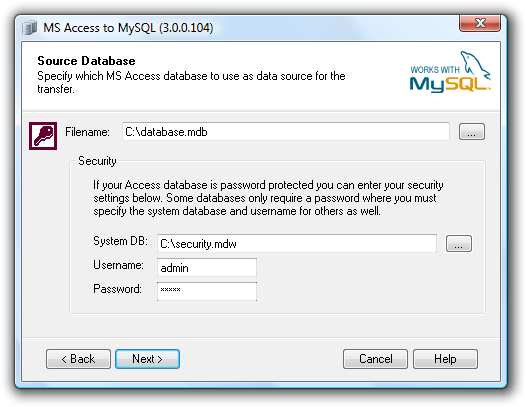
Specify Access database
The destination database and MySQL server connection settings are specified as shown below. You will have the choice of placing the result in a dump file instead of transferring it directly to another MySQL database.
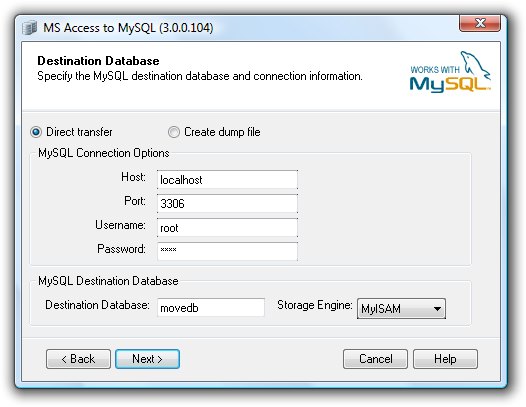
MySQL connection and destination settings
You can specify exactly which tables you want to transfer to the destination database. Just check the box in front of each table name you want to transfer and click next.
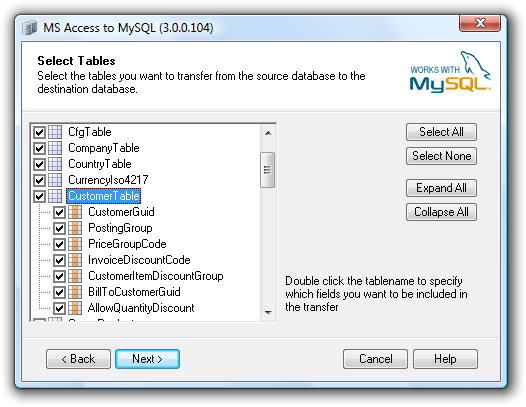
Selecting the tables to transfer
Additional transfer options can be set in the dialog shown below. Here you can specify if you want to transfer the indexes of the Access database to MySQL. You can also select not to transfer any records. This will only create the tables in the destination table and leave them empty.
In both Access and MySQL fields can have default values. When creating the tables in MySQL the program can preserve the default values specified in the Access field definition. Also auto number properties of a field can be transferred if you check the Auto number properties box.

Setting advanced transfer options
After answering all the questions in the wizard you can press Finish. The transfer will now run until all the selected tables are transferred. When the transfer is done you will see a small report telling you how much data was transferred.
The settings of the wizard can be saved in a .ini file.
Installation
You can download the latest version here. After downloading the setup program you should simply run it to install the program.
Testimonial
I've just downloaded MS Access to MYSQL so that I can convert a small library catalogue in order to take advantage of php and MYSQL to create a flexible user interface. Your programme was so simple and intuitive that I wish I'd discovered it months ago, instead of messing around trying to set up direct interfaces with MS Access. Thank you so much!
Version History
 Version history RSS Feed
5.4.0.282 (2017-11-07)
- Fix for default value after TINYINT filed.
5.4.0.281 (2017-10-27)
- Fix for problem where some Access tables were not shown.
- Fixed problem with backslash in source tables.
- Support for chr(0) or \0 in text strings.
5.4.0.274 (2016-01-05)
- Minor updates.
5.3.0.259 (2015-02-09)
- Better handling of boolean default values.
- Fix for error 55 in CmdFinish_Click.
5.2.0.252 (2014-09-24)
- Byte data is converted to TINYINT(3) UNSIGNED instead of just TINYINT.
- Sets a zero byte in empty required blob fields.
5.1.0.242 (2013-06-24)
- Can ignore blobs that are too large to transfer.
- Handles tables where indexes cannot be read.
- Support for table names with double spaces.
5.0.0.232 (2012-12-19)
- Database schema improvements.
5.0.0.229 (2012-12-18)
- Improvements for 64 bit systems.
4.0.0.192 (2012-02-28)
- Option to switch boolean value 'True' from 1 to -1.
- Specify a table name prefix for destination tables.
- Option to change datatype for memo fields from LONGTEXT to TEXT.
3.0.0.148 (2011-01-12)
- Changes in the user interface to render properly with different DPI settings.
- Fix for running unattended.
3.0.0.138 (2010-06-10)
- Support for default field value NOW().
3.0.0.131 (2010-04-16)
- Booleans are now created as TINYINT(1) instead of TINYINT(4).
3.0.0.123 (2010-03-08)
- Log folder is created if it doesn't exist.
- You can now create a dump file without having the MySQL ODBC driver installed.
- Digitally signed setup and executable.
3.0.0.117 (2009-06-23)
- Foreign keys in the Access database are now ignored to prevent duplicate keys.
3.0.0.114 (2009-05-16)
- The Brighthouse engine from Infobright is now supported.
- Auto commit can now be disabled to increase performance on transactional database engines.
3.0.0.108 (2008-11-28)
- New MySQL 6.0 storage engines added (Falcon, Maria).
- Storage engine now specified using ENGINE= instead of TYPE= in CREATE TABLE statement. This enables support for MySQL Server 6.0.
- Support for complex Access 2007 datatypes: dbComplexByte (102), dbComplexInteger (103), dbComplexLong (104), dbComplexSingle (105) dbComplexDouble (106), dbComplexGUID (107), dbComplexDecimal (108), dbComplexText (109).
3.0.0.104 (2008-11-10)
- Support for international characters added with UTF8 encoding.
- Default DB engine changed from InnoDB to MyISAM.
- Support for MyODBC 3.x was discontinued. Only MyODBC 5.x is now supported.
- Fields of type currency are now created as DECIMAL(19,4) instead of DECIMAL(19,0).
3.0.0.97 (2008-09-23)
- Fix: The program no longer fails if the database contains linked tables.
3.0.0.96 (2008-07-26)
- New feature: Disable the DROP and CREATE statement for tables.
- New feature: Include column list in INSERT statements.
- Support for MySQL ODBC 5.1.
- Ini files are no longer case sensitive.
- Dependency of Scripting.Dictionary was removed.
3.0.0.66 (2008-01-15)
- Support for Microsoft Access 2007 databases (accdb and accde).
2.0.0.64 (2007-09-02)
- Setup program modified for better Vista support.
2.0.0.56 (2007-05-10)
- Boolean fields are represented as 0 and -1. This is a change from 0 and 1.
- Empty strings are now transferred as a zero length string instead of a NULL value.
- Small improvement performance.
2.0.0.48 (2007-05-07)
- Improved support for decimal and currency fields. Reads precision and scale from the source field.
- Requires MySQL ODBC 3.51.14.0 or later.
- Connection database parameter removed.
2.0.0.46 (2006-03-19)
- Support for password protected Microsoft Access databases. Both shared security and user-level security is supported.
2.0.0.41 (2005-08-30)
- Database name is quoted to improve robustness towards creative database names.
2.0.0.40 (2005-08-27)
- Command line interface fixed.
2.0.0.37 (2005-07-28)
- Support for decimal numbers.
2.0.0.36 (2005-07-27)
- Before this version a table was not copied if no fields were selected. From this version all fields are copied if none is selected. This lets the program react to changes in the original schema.
2.0.0.35 (2005-07-26)
- Select individual fields from the tables to copy.
1.2.0.31 (2005-01-22)
- Bugfix: Data type 'Simple' is now supported.
- Feature: You can now save the wizard settings without running the actual conversion.
1.2.0.30 (2004-12-12)
- Mod: Support for ODBC connections for MySQL Server 4.1. This server version requires a reference to an existing database when connecting through ODBC.
1.2.0.28 (2004-11-20)
- Bugfix: Fixes boolean fields with no default value. This error was introduced in 1.2.0.27.
1.2.0.27 (2004-11-19)
- Default boolean values are set to 0 or 1 instead of false or true.
- Bugfix: Handling of empty binary fields fixed.
1.2.0.25 (2004-11-12)
- Help button open online help on web site.
1.2.0.23 (2004-11-09)
- Bugfix: When selecting a dump file in the common dialog it didn't set the value in the wizard.