
| Copy File Name |  Download |
Copy File Name
Introduction
Copy File Name is a small program that will enable you to right click any file and select "Copy File Name" from the context menu. This will copy the name of the selected file to the clipboard. Before the name is copied you will see a list of different representations of the file name.
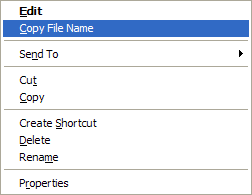
Using Copy File Name
When you right click the file and chooses Copy File Name the program will display a list of file names. All entries in the list are different representations of the selected file name. Depending on where you plan to use the file name you can select either type and place it on the clipboard.
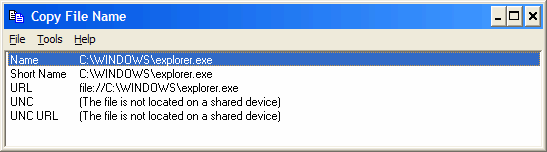
You select a file name by pressing the return key or left clicking using the mouse.
Installation
You can download the latest version here. After downloading the setup program you should simply run it to install the program.
When the installation is finished you will have the Copy File Name and Copy Folder Name in your context menu.
Ratings
 Nonags |
 Softonic |
Version History
2016-02-18 (2.2.0.22)
- Added the base file name without extension to the list.
- Digitally signed installer.
2016-01-22 (2.1.0.20)
- Position the dialog at the mouse location.
2014-07-18 (2.0.0.18)
- Convert backslash to forward slash in URL syntax.
2010-11-10 (2.0.0.11)
- Fix: Uninstall removes the Copy Folder Name menu item from the context menu.
- Registration in the File Explorer is now only done from the setup program.
2009-05-21 (2.0.0.10)
- Can now copy folder names also.
2007-09-02 (2.0.0.7)
- C++ and C# file name syntax added.
- Setup program modified for better Vista support.